How Email Servers Work
How Email Servers Work: A Simple Guide for Everyday Users
Every day, billions of emails travel across the internet in seconds, yet most people never think about what actually happens between hitting "send" and a message landing in someone's inbox. Understanding the basics can help you make smarter choices about privacy, security, and which email services you trust with your data.
The Journey of an Email
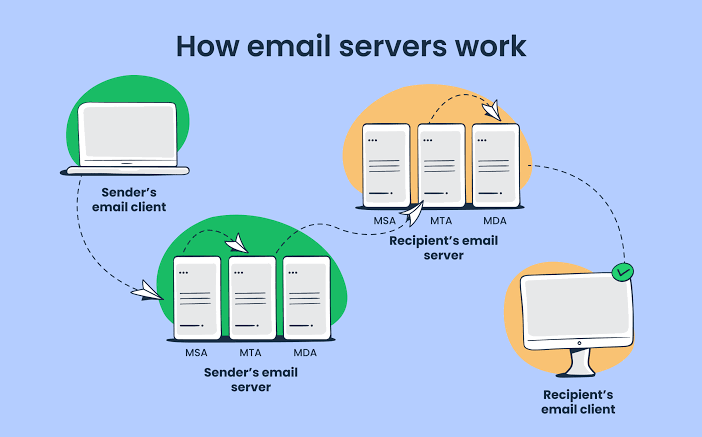
When you send an email, it doesn't travel directly to the recipient's computer. Instead, it passes through several servers, each playing a specific role:
1. Mail User Agent (MUA) This is the app or webpage you use to write and send email — Gmail, Outlook, or a webmail interface. It's your entry point into the system.
2. Mail Transfer Agent (MTA) Once you hit send, your email provider's MTA takes over. It looks up the recipient's domain and figures out where to send the message using the Domain Name System (DNS).
3. DNS and MX Records Every domain has "MX records" (Mail Exchange records) that tell the internet which server is responsible for receiving mail for that domain. This is how "yourmessage@gmail.com" gets correctly routed to Google's servers instead of ending up somewhere random.
4. Mail Delivery Agent (MDA) Once the message reaches the recipient's mail server, the MDA sorts it into the correct inbox, applying spam filters and security checks along the way.
Why This Matters for Privacy
Because email passes through multiple servers, each stop is a potential point where data could be logged, scanned, or — in weaker systems — intercepted. This is one reason:
- Reputable providers use encryption (like TLS) to protect messages in transit.
- Free or low-quality email services may not secure this pipeline properly.
- Temporary or disposable email addresses exist precisely to limit how much of this data trail is ever linked to your real identity.
Common Misconceptions
"Deleting an email removes it everywhere." Not necessarily. Once a message is delivered, copies may exist in backups, spam filters, or the sender's own servers.
"All email providers are equally secure." Security varies widely. Some providers scan email content for advertising purposes; others prioritize privacy by design.
"Email is instant and always reliable." Delivery can be delayed or fail silently due to spam filtering, server downtime, or misconfigured DNS records — which is why confirmation emails sometimes take a few minutes to arrive.
What This Means for You
Understanding this pipeline helps explain why using a temporary email address for one-off signups makes sense: it limits how many mail servers ever see and store information tied to your real, permanent identity. Every additional server that touches your real email is another potential point of exposure — a risk that's easy to avoid for non-essential signups.
Conclusion
Email feels instantaneous, but behind the scenes it involves a coordinated relay of servers, DNS lookups, and security checks. Knowing how this system works empowers you to make better decisions about which addresses to use, when to trust a service, and how to protect your digital identity.